Billing
Seat pricing tiers, buying and changing seats, Email usage, proration, failed payments and the grace period, invoices and taxes.
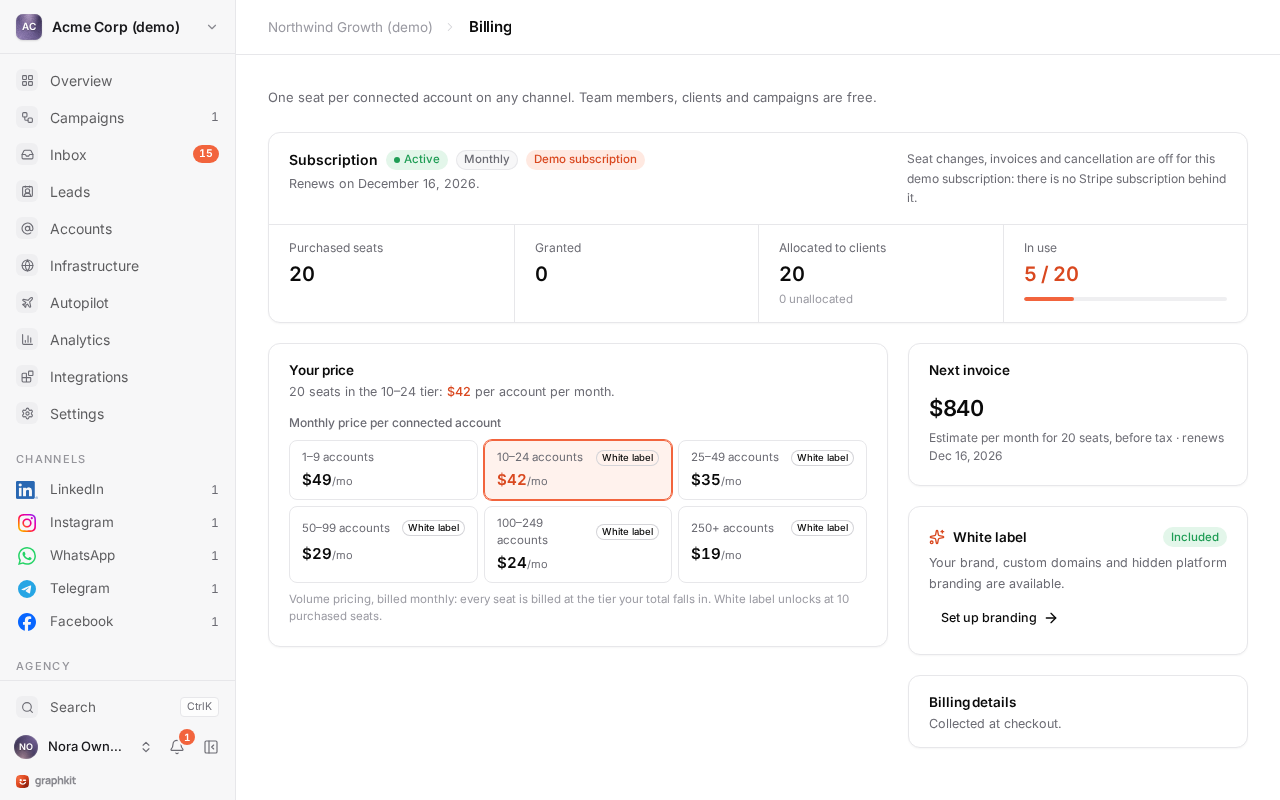
GraphKit is priced per connected account per month. One seat covers one connected account on any channel: LinkedIn, Instagram, WhatsApp, Telegram or Facebook (with its Pages). Team members, workspaces, campaigns, leads and integrations are free, and no feature depends on a plan.
Billing is monthly only. There is no annual plan and no free trial.
How pricing works
Every seat is billed at the price of the tier your total seat count falls in (volume pricing). Buying more seats lowers the price of all of them, not only the extra ones.
| Connected accounts | Per account per month |
|---|---|
| 1 to 9 | $49 |
| 10 to 24 | $42 |
| 25 to 49 | $35 |
| 50 to 99 | $29 |
| 100 to 249 | $24 |
| 250+ | $19 |
| Seats | Price per seat | Monthly total, before tax |
|---|---|---|
| 5 | $49 | $245 |
| 10 | $42 | $420 |
| 30 | $35 | $1,050 |
| 120 | $24 | $2,880 |
| 300 | $19 | $5,700 |
Agencies buy seats once for the whole organization, so the tier follows the total across every client. White-label is included in every plan, with no extra charge and no minimum number of seats. Prices are in US dollars and exclude tax.
What uses a seat
An account uses a seat while it is connecting, active, waiting for a reconnect, restricted or paused. Disconnecting or removing an account frees its seat straight away, and the account's history stays.
An account can only connect when the workspace has a free seat. When there is none, the connect screen says so and links to billing.
Buy seats
Organization owners manage billing; agency managers can read it. Open Billing, choose Buy seats, pick the number and pay through Stripe Checkout.
GraphKit is sold to businesses for business use only. Checkout asks for:
- your legal business name,
- your billing address,
- your tax ID (VAT number or equivalent).
The pay button carries this notice: "GraphKit is sold to businesses for business use only. Prices exclude taxes: where we do not charge tax, your business accounts for any tax due in its own country, for example under the reverse charge."
Seats are available as soon as the first payment succeeds. The seller is Mindroot Ltd, a company registered in England and Wales (no. 16543299).
Change the number of seats
Adding seats
Raise the number in Billing. Stripe invoices the prorated remainder of the current month straight away, and the new seats are available once that invoice is paid. Until then the billing page shows the pending number and a link to the invoice.
Removing seats
Lower the number in Billing. The unused time becomes a credit on your next invoice; it is not refunded.
You cannot go below the seats in use. If more accounts are connected than the new number, the change is refused with the counts, and you disconnect or remove accounts first. Agencies must also lower client seat allocations first.
Sending & warmup
Sending & warmup is billed per mailbox on the same subscription, never per email:
- the Email add-on, $30 a month, one fee for the whole organization (every workspace and client), added when sending & warmup is turned on in a workspace;
- +$2 a month per mailbox bought from GraphKit with sending & warmup (or warmup only), and $3 per outside mailbox.
Changes are prorated. The billing page shows the add-on, the mailboxes per kind, each workspace's share and the monthly total. Once no mailbox has sending & warmup on, you can cancel the add-on there. Customers who connect their own Warmbly plan pay neither. Mailboxes bought from GraphKit are $3 each a month on their own.
Cancel
Cancelling stops the subscription at the end of the current period. Accounts keep working until then, and you can resume before the period ends. When the subscription ends, nothing is deleted: accounts stay in place but no longer have seats.
Failed payments and the grace period
If a renewal payment fails, Stripe retries it and emails your billing contact. GraphKit gives you a 7-day grace period from the first failure:
| When | What happens |
|---|---|
| Days 1 to 7 | Everything works. The app shows a warning with the date the grace period ends. |
| After day 7 | New account connections and campaign launches are blocked (payment_overdue). Running campaigns, the inbox, accounts and your data keep working. |
| Payment succeeds | Everything is restored immediately. |
GraphKit never deletes data or disconnects accounts because of a failed payment.
Invoices and payment details
Open Billing and choose the billing portal to update the payment method and download every invoice. The billing page also shows your next invoice, including any proration, and your business details as they appear on invoices.
Seat changes are made on the billing page rather than in the portal, so GraphKit can check them against the accounts you have connected.
Refunds
There are no automatic refunds. Removing seats credits the next invoice. For anything else, contact support.