Email integrations
Add email to your sequences through Warmbly, Instantly, Smartlead or lemlist, and keep replies, bounces and unsubscribes in sync across every channel.
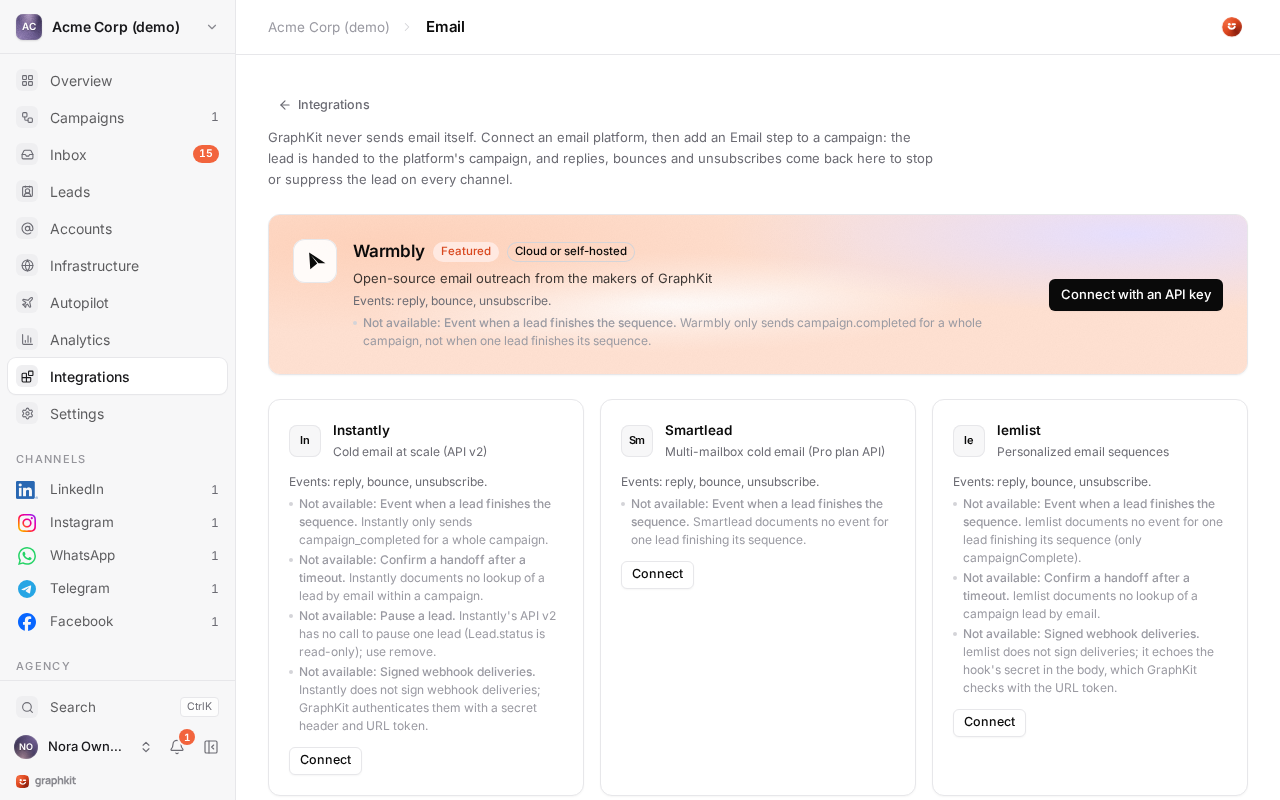
GraphKit never sends email itself. You connect the email outreach platform you already use, and a campaign's Email handoff step adds the lead to a campaign there. The platform sends the emails on its own schedule, from its own mailboxes, and reports back:
| The platform reports | GraphKit does |
|---|---|
| A reply | Counts it as a reply on any channel: the lead stops in campaigns with stop on reply. Emits email.replied. |
| A bounce | Marks the lead's email invalid, so later handoffs skip it. Emits email.bounced. |
| An unsubscribe | Suppresses the lead on every channel and stops its campaigns. Emits email.unsubscribed. |
In the other direction, when a lead replies on a social channel or is suppressed, GraphKit pauses or removes it on the email platform. Both are on by default and can be turned off per connection.
Connect a platform
Open Integrations → Email and choose the platform. You need a role that can manage webhooks (client admin or an agency role). GraphKit checks the credentials with the platform before saving, stores them encrypted, and registers the webhook it needs automatically. A workspace can connect several platforms.
Each connection shows its status, its webhook status and an event log of everything the platform sent.
Warmbly
Warmbly is open-source email outreach from the makers of GraphKit, on Warmbly Cloud or self-hosted. It is the most complete integration: every add is idempotent, leads can be paused, removed and looked up, and every webhook is signed.
There are two ways to connect:
- Connect with OAuth (Warmbly Cloud). Sign in to Warmbly and approve access. Nothing to copy.
- Connect with an API key. In Warmbly, open Settings → API keys and create a key with
read_campaigns,write_campaigns,read_contacts,write_contacts,bulk_contacts(to remove leads) andwebhooks(to register the webhook).
For a self-hosted Warmbly, choose the API key option and enter your instance's API base URL, for example https://warmbly.example.com/v1. It must use https. OAuth is available for Warmbly Cloud only.
The webhook (campaign.reply_received, campaign.email_bounced, campaign.unsubscribed) is registered and verified automatically. If registration fails, for example because the instance cannot reach GraphKit, create the endpoint in Warmbly with the connection's webhook URL, subscribe it to those three events and paste its whsec_ secret into the connection.
Instantly
- API key: an API v2 key with
workspaces:read,campaigns:read,leads:create,leads:deleteandwebhooks:all. Version 1 keys do not work. - Webhook: three webhooks (reply, bounce, unsubscribe) are registered for all campaigns.
- Not available: pausing a single lead (GraphKit removes it instead), looking up a lead after an uncertain add, signed deliveries. GraphKit secures deliveries with a secret token in the webhook URL and header.
Smartlead
- API key: Settings → API key in Smartlead. API access needs the Pro plan or higher.
- Webhook: a user-level webhook for replies, bounces and unsubscribes is registered. For signature checks, turn on signing for the webhook in Smartlead and paste its
whsec_secret into the connection. - Not available: idempotent adds. When an add times out, GraphKit looks the lead up by email before trying again, so it is never added twice.
lemlist
- API key: Settings → Integrations → API key in lemlist.
- Webhook: one hook for every event type is registered (lemlist allows one per URL), with a secret that lemlist echoes in every delivery. Disconnecting deletes the hook.
- Not available: looking up a lead after an uncertain add, signed deliveries. When an add is uncertain, GraphKit does not retry it blindly.
Capabilities at a glance
| Warmbly | Instantly | Smartlead | lemlist | |
|---|---|---|---|---|
| OAuth | Yes | |||
| Self-hosted | Yes | |||
| Idempotent add | Yes | Yes | ||
| Pause a lead | Yes | Yes | Yes | |
| Remove a lead | Yes | Yes | Yes | Yes |
| Signed webhooks | Yes | Optional | ||
| Reply, bounce, unsubscribe events | Yes | Yes | Yes | Yes |
| Documented rate limit | 429 with Retry-After | 100 per second, 6,000 per minute | 429 | 20 per 2 seconds |
When a platform returns a rate limit, GraphKit waits for the time it asks for and continues. No platform reports when a lead finishes its email sequence.
Email steps in a campaign
| Step | Settings |
|---|---|
| Email handoff | The connection, the platform campaign, and the field mapping. |
| Email stop | The connection, one platform campaign or all of them, and pause or remove (remove is the default). |
Field mapping. Map platform fields to text with variables, for example first_name to {{first_name}} and industry to {{industry|SaaS}}. Standard fields are first_name, last_name, company_name, job_title, linkedin_url, phone and website; any other key becomes a custom variable on the platform. The lead's email address is always sent. With no mapping, GraphKit sends first name, last name, company and job title.
Rules.
- The handoff needs an email address that has not bounced. Otherwise the step's unreachable setting applies: skip, or stop the lead.
- Email steps are not limited by the campaign schedule or social daily limits, because the platform sends on its own schedule.
- If a connection is in error, email steps wait until it works again. If it was removed, leads at that step stop.
- An address the platform rejects (blocklisted, or already in another campaign) skips the step and the sequence continues.
- An email stop for a lead that was never handed off is recorded as skipped.
A typical sequence: LinkedIn invitation, wait 3 days, Email handoff for leads who have not accepted, and an Email stop on the branch where they accept, so they are not emailed while you talk on LinkedIn.
Analytics
Email handoffs and email replies are counted separately from social replies, so nothing is counted twice. See Analytics.